Introduction
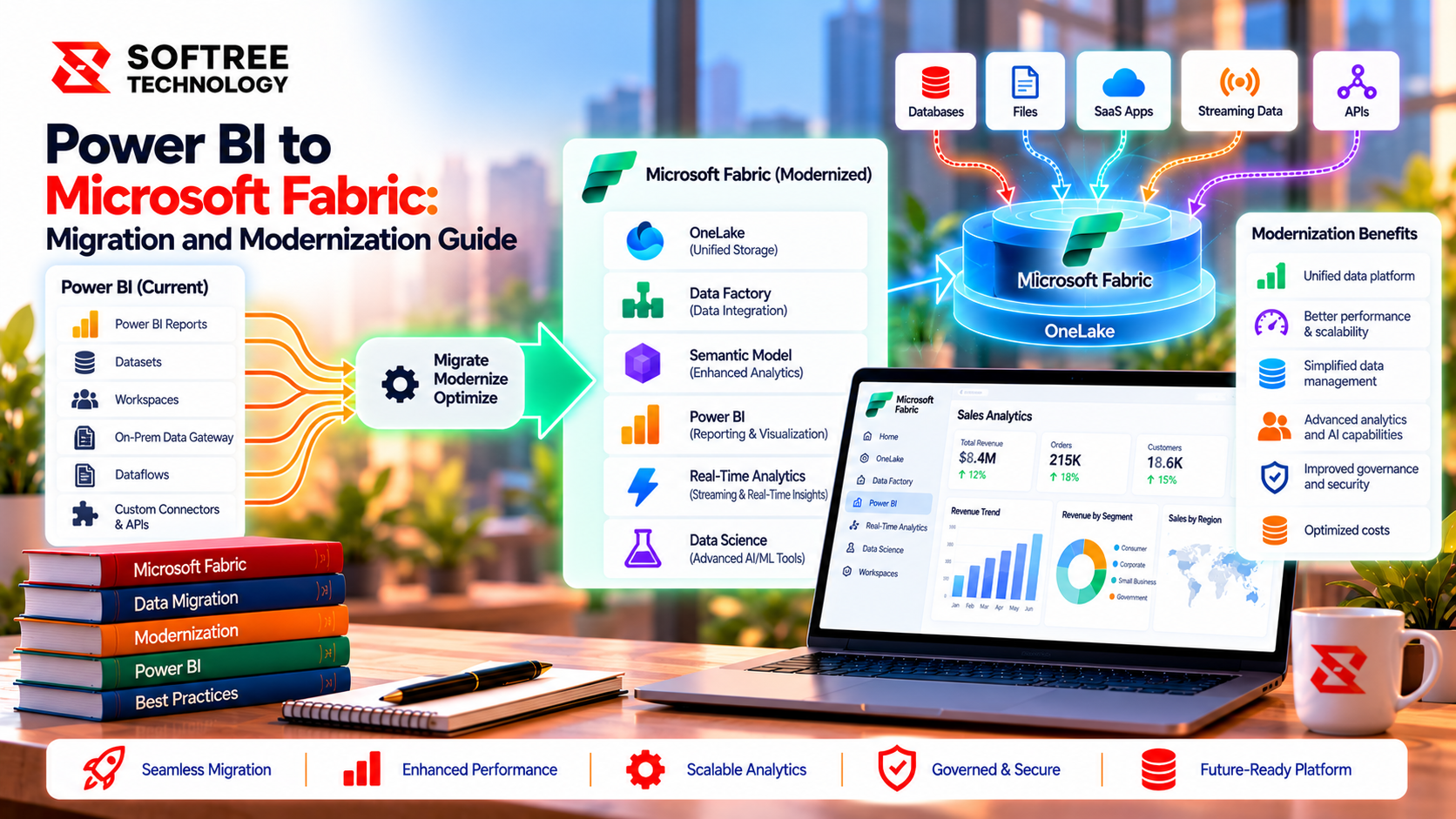
Moving Power BI to Microsoft Fabric does not necessarily mean rebuilding every report or migrating the entire analytics environment. For many organizations, modernization involves transitioning from Power BI Premium capacity to Fabric capacity, integrating reporting with OneLake and Fabric data engineering, or improving how semantic models and reports are managed.
The right approach depends on existing workloads, licensing, data architecture, security requirements, and business goals. A structured migration plan helps organizations preserve existing report functionality while identifying opportunities to improve data consistency, governance, and performance.
Key Takeaways
Power BI is already part of the Microsoft Fabric ecosystem, so migration scope should be based on business and technical requirements. Organizations can move eligible workspaces to Fabric capacity, connect reporting with Fabric data workloads, or optimize their existing Power BI environment.
Key takeaways include:
- Assess workspaces, reports, semantic models, dataflows, gateways, and dependencies before migration.
- Distinguish capacity migration from broader analytics modernization.
- Evaluate licensing, capacity sizing, data residency, and expected costs.
- Validate data accuracy, refresh schedules, report behavior, and security.
- Use shared semantic models to improve consistency and reduce duplicated data preparation.
- Roll out changes in phases with monitoring and rollback plans.
What We Learned
1. Assess the Existing Power BI Environment
Start by inventorying workspaces, reports, semantic models, dataflows, gateways, data sources, and dependencies. Identify duplicated reports, repeated transformations, inconsistent business calculations, and capacity constraints.
This assessment helps determine whether the organization needs a straightforward capacity migration, broader analytics modernization, or a combination of both.
2. Choose the Right Migration Path
There are three common approaches:
- Capacity migration: Reassign eligible Power BI workspaces from Premium per-capacity P SKUs to an appropriate Fabric F SKU.
- Analytics modernization: Integrate Power BI with Fabric pipelines, OneLake, Lakehouse or Warehouse storage, and shared semantic models where appropriate.
- Power BI optimization: Improve existing reports, refresh strategies, semantic models, and governance without redesigning the entire environment.
Not every organization needs a complete architectural redesign. Select changes according to measurable business value and workload requirements.
3. Connect Reporting with Fabric Data Workloads
Consider a retail organization maintaining separate Power BI reports for sales, inventory, and regional performance. Each report may use overlapping datasets and duplicated transformation logic.
A modernization approach can establish a shared data foundation using a Fabric Lakehouse or Warehouse. Fabric pipelines or Dataflow Gen2 prepare the data, while a governed semantic model provides consistent business measures to Power BI reports.
Before rollout, validate sales totals, DAX calculations, row-level security, refresh duration, and report response times. Move reports to the updated model in phases after business owners approve the results.
4. Validate Security, Performance, and Licensing
A successful migration requires more than moving workspaces to a new capacity. Review workspace roles, sharing permissions, row-level security, gateways, credentials, data residency, and capacity utilization.
Test report filters, refresh schedules, data accuracy, and performance using representative workloads. Confirm licensing and cost estimates before production deployment.
5. Follow a Controlled Production Rollout
Use separate development, test, and production environments. Manage changes through supported Git integration and deployment pipelines, apply least-privilege access, and monitor capacity consumption.
For a capacity-only migration, avoid combining the move with unnecessary architectural changes. For broader modernization, introduce Fabric components incrementally and maintain documented rollback procedures.
Next Steps
Start with an assessment of your Power BI environment to identify migration dependencies, capacity requirements, duplicated data preparation, and opportunities for reusable semantic models.
Softree Technology helps organizations assess analytics environments, plan Microsoft Fabric architectures, modernize data models, and prepare production-ready data and reporting workloads. Contact Softree to discuss a Power BI-to-Fabric migration roadmap aligned with your business requirements.
https://www.softreetechnology.com/services/microsoft-fabric-development-services