Introduction
As enterprise data environments grow, managing a separate pipeline for every table or source can create unnecessary duplication, increase maintenance effort, and make consistent monitoring difficult. Even a small change to logging, retries, or validation may need to be repeated across multiple pipelines.
Metadata-driven pipelines in Microsoft Fabric address this challenge by separating reusable pipeline logic from configuration metadata. With Fabric Data Factory, a shared pipeline can process compatible sources using configurable parameters, load strategies, and source-to-target mappings. This approach helps teams scale ingestion while maintaining validation, monitoring, and operational control.
Key Takeaways
Metadata-driven pipelines help standardize ingestion across compatible data sources by using configuration tables to control reusable workflows. They can reduce duplicated orchestration, improve onboarding consistency, and centralize monitoring, provided metadata is validated and governed.
- Reuse pipeline templates across compatible tables and sources.
- Use configuration metadata to define source, target, and load type.
- Support full and incremental loading through controlled execution paths.
- Track pipeline status, run duration, row counts, and watermarks where available.
- Validate metadata and protect credentials before execution.
- Advance incremental checkpoints only after successful writes and validation.
What We Learned
How Metadata-Driven Pipelines Work
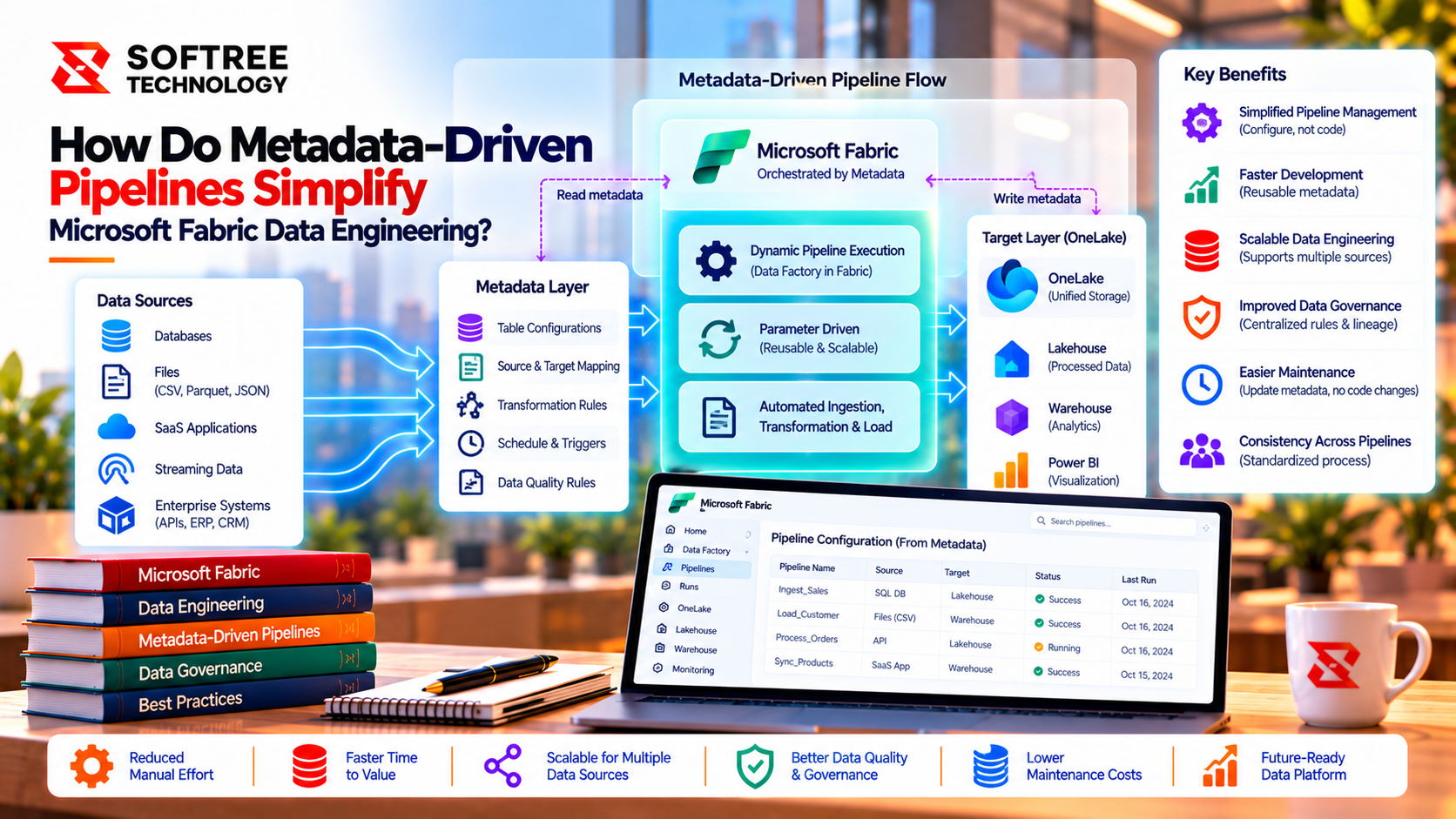
The architecture separates the control plane from data movement. A configuration table defines what should be loaded, while a Fabric Data Factory orchestration pipeline reads active records, validates them, and passes approved values to parameterized activities.
The workflow follows five stages:
- Configure: Store source objects, target objects, load types, watermarks, and active flags.
- Orchestrate: Read eligible configuration records.
- Execute: Run the appropriate copy, notebook, or transformation activity.
- Store: Write data to the designated Lakehouse or Warehouse location.
- Monitor: Record run identifiers, status, duration, row counts where available, and error details.
This structure allows teams to maintain a reusable ingestion framework while onboarding additional compatible workloads through configuration.
A Practical Example: Orders and Customers
Consider a retail platform ingesting Orders and Customers from the same relational source. Both tables can use a shared pipeline pattern, but their loading requirements differ.
- Orders: Uses incremental loading based on a reliable modification timestamp.
- Customers: Uses a full load for initial ingestion.
The configuration defines each source, destination, load type, and watermark column. The orchestrator validates the configuration and selects the appropriate execution path.
For incremental processing, the pipeline retrieves the last successful watermark, extracts eligible changes, and writes them using an agreed merge or upsert strategy. The checkpoint advances only after the data write and required validation succeed.
A watermark alone does not prevent duplicate records or correctly update existing records. Stable keys, idempotent writes, late-arriving changes, and source timestamp reliability must also be addressed.
When Should You Use Metadata-Driven Pipelines?
This pattern works best when multiple tables share a repeatable ingestion contract and new sources are onboarded regularly.
Consider it when you need:
- Consistent audit logging and retry policies.
- Reusable source-to-target mappings.
- Centralized configuration and workload ownership.
- Standardized full and incremental load patterns.
- Easier onboarding across compatible data sources.
Avoid forcing every workload into one generic pipeline when sources require fundamentally different business logic or exceptional processing. Parameterize values that vary, but separate workflows when their behavior differs.
Production Readiness and Governance
Metadata-driven pipelines still require production engineering controls. Configuration errors can direct data to the wrong destination, and poorly managed checkpoints can cause data gaps or duplicate records.
A production-ready implementation should include:
- Validation of required fields, allowed load types, and approved target paths.
- Secure connections and secret management rather than credentials stored in metadata.
- Idempotent write strategies and bounded retries.
- Concurrency limits to protect source systems and Fabric capacity.
- Per-workload watermark tracking.
- Run identifiers, timestamps, statuses, and sanitized error details.
- Configuration ownership, versioning, change review, and recovery procedures.
A successful pipeline status alone does not prove that the expected data arrived correctly. Combine Fabric monitoring with a durable audit table and data-quality validation.
Next Steps
Start with a small set of compatible tables and establish a reusable pipeline template before expanding across your data environment. Define the metadata schema, validate configuration records, test full and incremental loading, and verify restart behavior before enabling production schedules.
Softree Technology helps organizations design and implement Microsoft Fabric data engineering frameworks, including reusable pipelines, incremental ingestion, governance, monitoring, and production-readiness controls.
Ready to scale ingestion without multiplying pipelines? Connect with Softree Technology to plan a governed, observable Microsoft Fabric data engineering framework.
https://www.softreetechnology.com/services/microsoft-fabric-development-services