Introduction
AI agents are moving beyond answering questions. They can search customer records, retrieve employee information, update sales opportunities, and trigger business processes. When these agents connect to Microsoft Dataverse, they gain access to valuable enterprise information.
But this creates an important security question: Does the agent have access only to the information required for its task, or can it see more than it should?
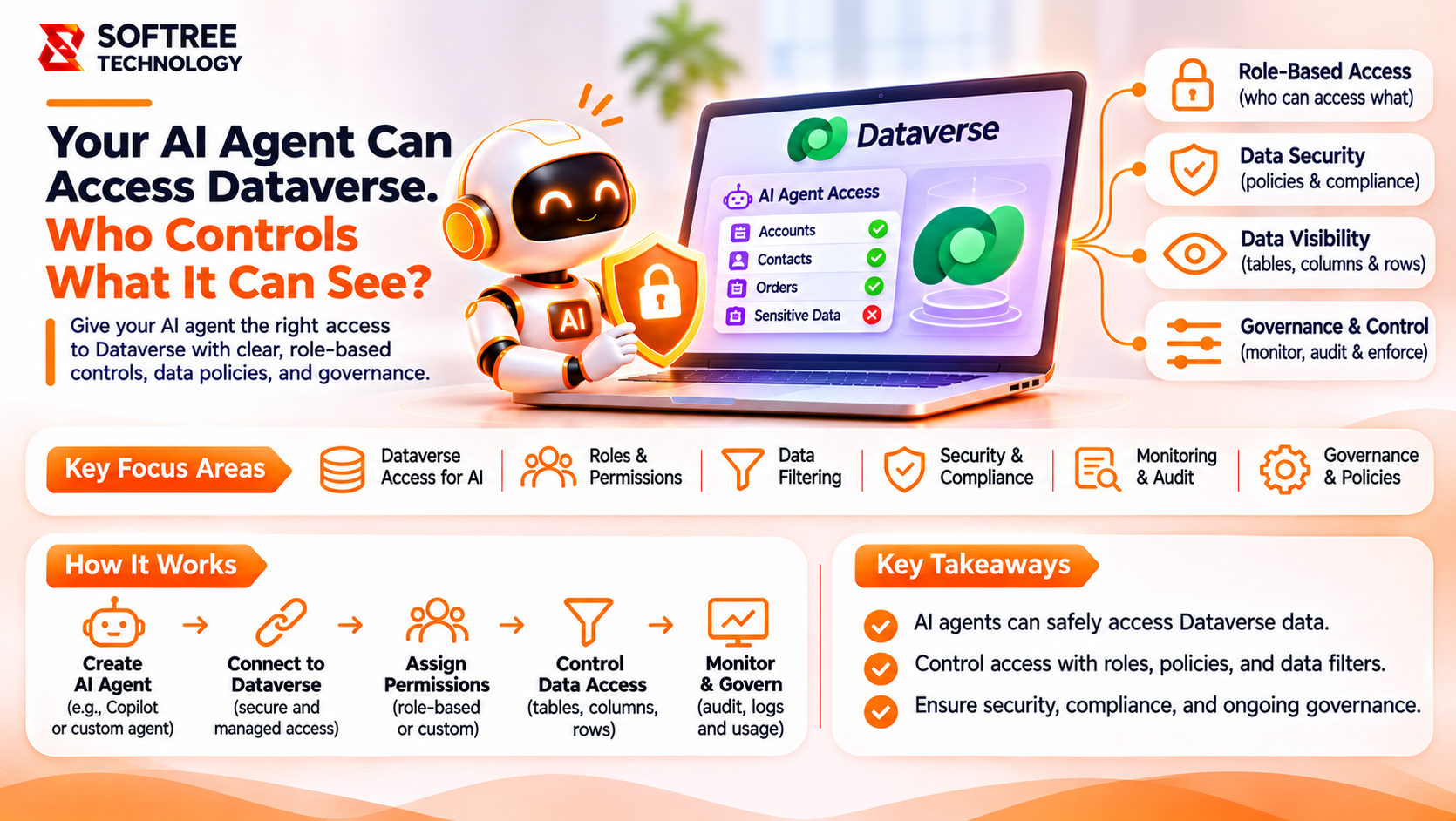
Giving an AI agent access to Dataverse does not mean giving it unrestricted access to business data. Organizations need to control its identity, permissions, record visibility, and ability to perform actions.
This is where Dataverse AI security becomes essential. Enterprises must extend their existing security practices to AI agents while maintaining visibility into what each agent accesses and changes.
Key Takeaways
- Connecting an AI agent to Dataverse does not mean it should receive unrestricted access.
- Security roles define table privileges and available operations.
- Row-level security controls which individual records an agent can access.
- Column-level security protects sensitive fields.
- User authentication and dedicated agent identities support different access scenarios.
- Monitoring and auditing help organizations track agent activity and investigate changes.
How Does Dataverse Control AI Agent Access?
Dataverse controls AI agent access through identity, authentication, and its existing security model.
The key controls include:
Security Roles: Define which tables and operations an identity can access, including read, create, update, and delete privileges.
Row-Level Security: Restricts which individual records an identity can view or modify.
Column-Level Security: Protects sensitive fields within records and controls supported read, create, and update operations.
Business Units and Teams: Organize permissions and data access according to organizational responsibilities.
Agent Identity: Microsoft Entra Agent ID and Dataverse agent users provide a dedicated identity model for supported agent scenarios.
For example, a sales agent might be allowed to read and update assigned leads without accessing employee payroll records or unrelated customer information.
The important principle is that an AI agent should receive only the permissions necessary to perform its intended tasks.
Microsoft's Dataverse MCP documentation also confirms that the MCP server respects Dataverse security roles and row-level security. It does not automatically bypass existing Dataverse permissions.
How Dataverse AI Security Works
A secure agent-access process typically involves five steps:
- Identify the agent: Determine whether the agent operates through an authenticated user connection or a dedicated agent identity.
- Authenticate access: Establish the identity used when the agent connects to Dataverse.
- Assign permissions: Configure appropriate security roles, table privileges, and record access.
- Execute the request: The agent performs an operation within the permissions of its security context.
- Monitor activity: Review access and changes through available auditing and monitoring capabilities.
One important distinction is the identity model.
With user authentication, an agent accesses connected services using the user's permissions. With a dedicated agent identity, the agent can have its own assigned permissions for autonomous or interactive operations.
These approaches serve different scenarios and should be selected according to the business process.
How an AI Agent Accesses Dataverse Securely
A typical architecture follows this process:
- An employee submits a request through an AI agent, such as one built with Copilot Studio.
- The authentication layer establishes the user's or agent's identity.
- Dataverse evaluates the identity against its security configuration.
- Security roles, row-level security, and column-level security determine the permitted access.
- The agent performs only authorized actions.
- Auditing and monitoring capabilities help track access and data changes.
The security evaluation determines whether the identity can perform the requested operation. An agent should not bypass these controls simply because the request comes through an AI interface.
Key Components of Dataverse AI Security
Microsoft Entra ID
Provides authentication and identity management for connected applications and users.
Microsoft Entra Agent ID
Provides a dedicated identity framework for supported AI agent scenarios.
Dataverse Agent User
Associates an agent identity with a Dataverse environment so administrators can assign appropriate security roles.
Security Roles
Define table privileges and access levels, including the operations an identity can perform.
Row-Level Security
Controls access to individual records based on the configured security model.
Column-Level Security
Restricts access to sensitive fields through column security profiles.
Business Units and Teams
Help organize permissions and data access across organizational structures.
Auditing and Monitoring
Help track agent activity and investigate changes to business records.
Real-World Example: Securing a Sales AI Agent
Imagine an organization using Dataverse to manage leads, customer information, and sales opportunities.
The organization introduces an AI sales agent to research assigned leads, summarize customer information, and update follow-up activities.
The agent needs access to relevant sales data, but it should not have unrestricted access to the entire Dataverse environment.
The administrator assigns a purpose-built security role that allows the agent to read and update eligible leads and create relevant activities.
The workflow can include:
- A sales employee requests information about a lead.
- The AI agent authenticates using its configured identity.
- Dataverse evaluates the assigned security role.
- The agent accesses only the permitted lead records.
- It generates a lead summary and recommends a follow-up action.
- The employee reviews the recommendation.
- An approved record update is performed in Dataverse.
The agent does not need access to unrelated employee records, financial information, or sensitive customer fields.
This approach allows the organization to use AI for sales productivity while keeping access aligned with the agent's responsibilities.
When Should You Use Dedicated AI Agent Security?
Dedicated agent security is particularly useful when:
- Agents access sensitive customer or employee information.
- Multiple agents perform different business functions.
- Agents execute autonomous or background workflows.
- AI agents create or update Dataverse records.
- Organizations need to distinguish agent actions from human actions.
- Auditability and accountability are important.
For simple interactive scenarios, user authentication may be appropriate because the agent operates within the user's existing permissions.
For autonomous scenarios, a dedicated agent identity with narrowly defined permissions can provide clearer ownership and control.
Avoid using a highly privileged shared account simply to make an agent work. This can create excessive access and make activity harder to attribute.
Recommended Architecture for Production AI Agents
A production design should separate the agent's identity, authorization, data access, and monitoring responsibilities.
Recommended practices include:
- Give every agent a clearly defined business purpose.
- Use dedicated identities where the supported architecture requires them.
- Assign least-privilege security roles.
- Restrict access to required tables, records, and columns.
- Separate read operations from create, update, and delete operations.
- Require human approval for sensitive business actions.
- Review authentication and connection configurations.
- Monitor agent activity and investigate unexpected access.
- Document agent ownership, lifecycle, and retirement procedures.
Microsoft Entra Agent ID with Dataverse agent users is an emerging option for this architecture. Microsoft's documentation identifies the Dataverse agent-user capability as a preview, so validate availability and limitations before considering it for production.
Production Readiness Checklist
Before connecting an AI agent to Dataverse, verify that:
- Every AI agent has a documented business purpose.
- Agent identity and authentication methods are defined.
- Dataverse security roles follow least-privilege principles.
- Table and row-level access is tested.
- Sensitive columns have appropriate protection.
- Maker-provided credentials are reviewed.
- Autonomous operations use an appropriate identity model.
- Sensitive actions include approval controls.
- Agent activity and data changes are monitored.
- Ownership and access-revocation procedures are documented.
What We Learned
Securing AI agents requires more than connecting them to Dataverse and configuring an integration. Organizations must understand which identity an agent uses, what permissions it receives, which records it can access, and what operations it can perform.
A practical starting point is a sales agent that can access assigned leads but cannot view unrelated employee or financial records.
Security roles, row-level security, column-level security, and dedicated agent identities help establish these boundaries. Monitoring and auditing provide additional visibility into agent activity.
The key lesson is to design access controls before expanding AI agents into business-critical workflows. Least-privilege access and clear ownership should remain central to every implementation.
Next Steps
Connecting AI agents to enterprise data requires more than configuring an integration. Businesses need a clear security model that protects sensitive information while allowing agents to perform useful tasks.
Softree Technology helps organizations explore AI development, generative AI agents, Microsoft Power Platform, and custom application development. From designing agent architectures to implementing business integrations and automation, the focus is on building AI workflows aligned with operational and security requirements.
Planning to connect AI agents with Dataverse? Connect with Softree Technology to explore how secure AI architecture and Power Platform development can support your business requirements.
Explore our AI Development Services.